The short answer
- Delivery route planning software should take the order from the CRM and hand the driver a calendar entry — mapping, sequencing, costing and publishing in between, with nothing retyped.
- Before the build, one multi-drop run took 60–120 minutes to plan across four tools and another 30–60 minutes to type into the calendar. It is now 5–10 minutes and one click.
- That is 10–18 hours of skilled staff time back every week — roughly £8,000–£17,000 a year at a £15–£20/hour loaded admin cost, before any routing gains.
- Driver-hours law, mandatory breaks and vehicle licensing are enforced by the scheduler rather than remembered, and optimised stop orders typically trim 5–10% of miles.
- A comparable build costs £60,000–£150,000+ from a UK agency over 3–6 months. This one started from £5,000 and was carrying real routes within days.
Delivery route planning software earns its place when it owns the whole chain. Orders arrive from the CRM on their own, land on a map colour-coded by stock status, and are sequenced by an engine that knows real road drive times, offload windows and driver-hours law. The run is costed as it is built and published to the drivers' calendar in one click. No address, no stop and no invoice is ever retyped.
What was actually wrong with planning by hand?
Nothing dramatic — which is exactly why it survived for years. Four separate tools, none of them talking to each other, stitched together with copy-and-paste:
- The CRM held the orders — but every delivery had to be re-read and retyped out of it.
- A pin-mapping website was used just to see where the week's customers were, with every address pasted in by hand.
- A consumer mapping tool was used to guess a driving order between the pins — with no drive-time limits, no offload times, no break rules, no overnight logic, and no idea what the run would cost.
- The shared calendar was typed up last, one entry per drop, with invoices hunted out of the CRM and attached one at a time. Any change to the plan meant doing all of it again.
The costs were the quiet kind: senior time burnt on clerical assembly, routes that were driveable but not efficient, no record of what a delivery day actually cost, and mistakes whenever a postcode was mistyped or a stop forgotten. And zero historical data — once a week was driven, the knowledge of it evaporated.
How do the orders get onto the map?
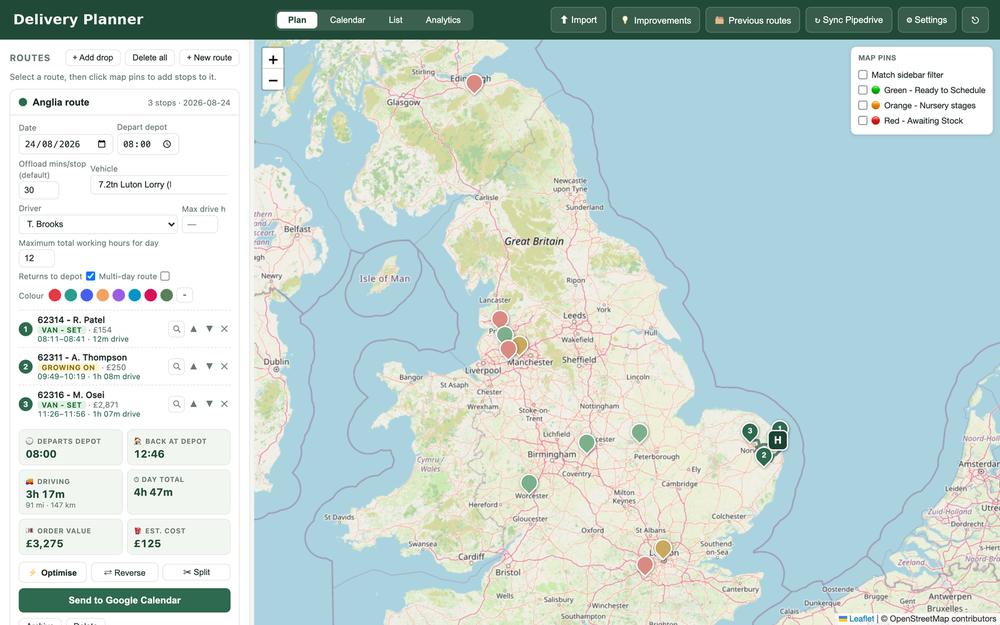
They arrive on their own. When the sales team flips one field on a CRM deal, the delivery appears in the planner within minutes — address geocoded, order value, customer, mobile number and PDF invoice already attached. Cancellations are the same field flipped back. The intake is duplicate-proof, and stage tags follow the deal as it moves.
How does the software decide the driving order?
One click proposes routes grouped by region or county, or the operator simply clicks pins on the map. The engine then schedules every stop against the constraints a consumer mapping tool has never heard of:
- Real road drive times from a road-network routing engine, not straight-line estimates.
- Per-stop offload windows, because a pallet of instant hedging is not a parcel.
- Legal driver-hours limits and the mandatory 45-minute break for the 7.2-tonne vehicle.
- Multi-day splitting with evening drive-ahead and realistic overnight positioning.
- Per-vehicle, bridge-height-aware routing — and a refusal to crew a lorry with a van-only driver, because vehicle licences are held against each driver.
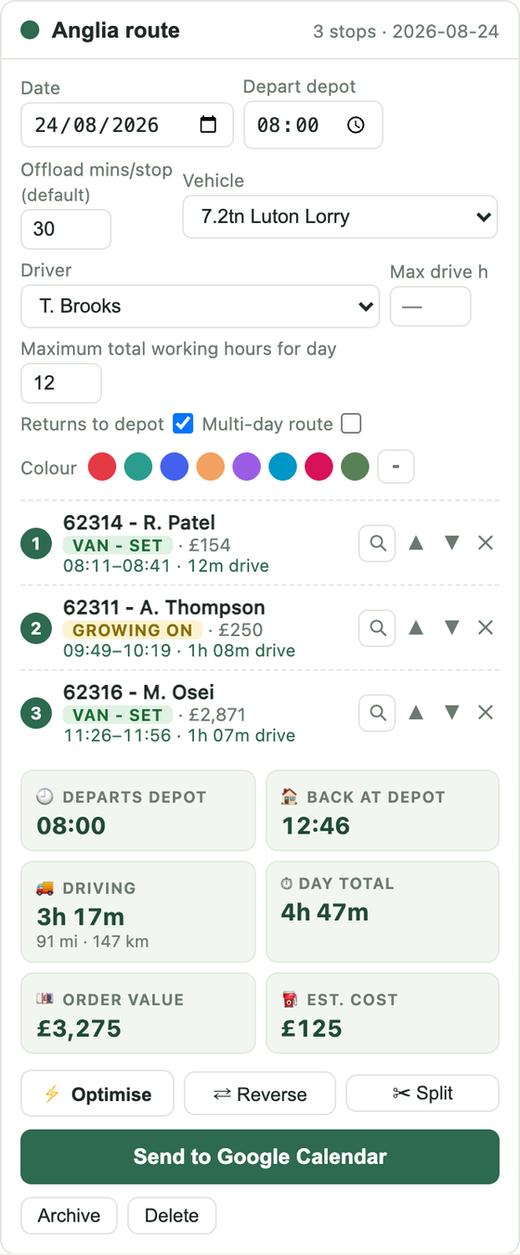
Every route shows its revenue, its estimated running cost, its load-space fill and its progress against the vehicle's revenue target as it is being built — so the operator is making a commercial decision, not just a geographic one.
How does the plan reach the drivers?
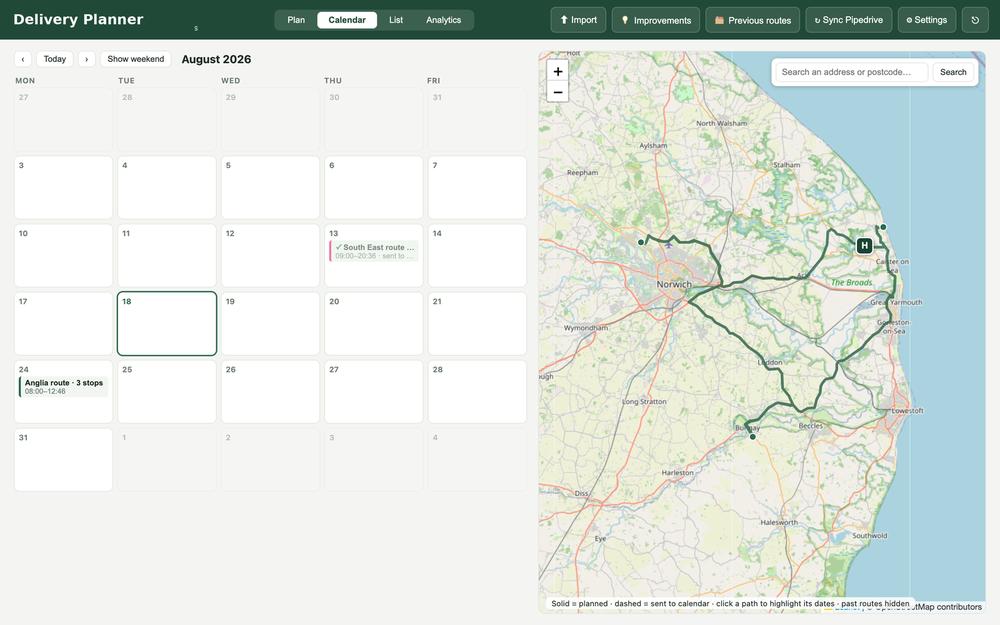
One button. Send to calendar creates a timed event per delivery carrying the customer, phone number, delivery notes, driver, and named links to both the invoice PDF and the CRM deal — plus a banner event spanning the whole run with departure, return, drive time and total value. Re-sending after a change updates the same events in place; recalling deletes them. The drivers simply follow their calendar.
That single button replaced 30 to 60 minutes of typing per run, plus hunting invoices out of the CRM one at a time — and it removed the reason nobody wanted to change a plan once it was published.
What did it actually save?
Conservative estimates against the workflow the software replaced, easy to check against the operator's own experience:
| Task | Before | After | Time returned |
|---|---|---|---|
| Route planning & mapping | 60–120 min per run | 5–10 min | ≈ 6–9 hrs/week |
| Calendar entry & invoice attaching | 30–60 min per run | One click | ≈ 3–5 hrs/week |
| Replanning after changes | Repeat the whole process | Seconds | ≈ 1–2 hrs/week |
| Chasing invoices & order details | Ad hoc, constant | On every event and pin | ≈ 1–2 hrs/week |
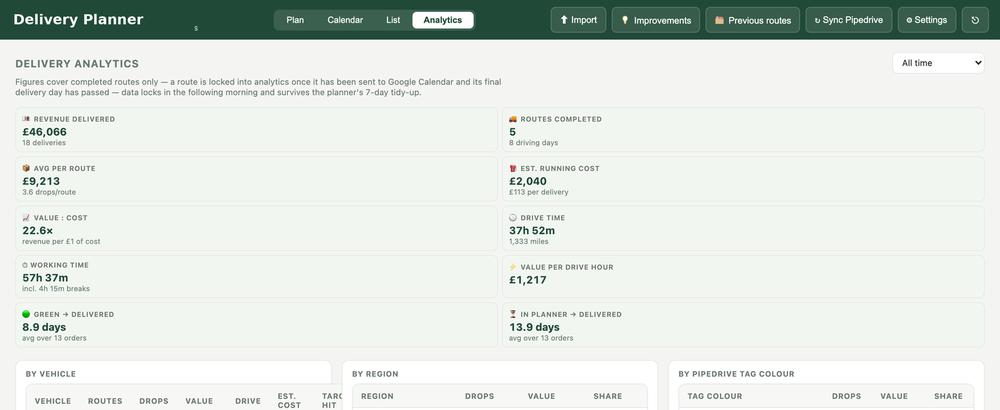
Three things came free with the rebuild. Fewer errors, because no re-typing means no mistyped postcodes, forgotten stops or stale calendar entries — failure modes that each cost a wasted journey or a let-down customer. Compliance by construction, because driver-hours law and break rules are enforced by the scheduler rather than by memory. And decisions from data: revenue per drive hour, cost per delivery, vehicle target attainment and ready-to-delivered lead times now exist as numbers.
What does delivery route planning software cost to build?
This is a genuine multi-integration logistics platform: CRM sync, geocoding, road-network routing, a constraint-based scheduling engine, calendar API publishing with OAuth, PDF handling, fleet management and an analytics warehouse. Indicative UK market rates for that scope in 2026:
| Approach | Typical cost | Timeline | Notes |
|---|---|---|---|
| UK software agency | £60,000 – £150,000+ | 3–6 months | Discovery workshops, sprint teams, project-management overhead |
| Established freelance developer | £20,000 – £45,000 | 2–4 months | Single developer at £350–£600/day across 40–80+ days |
| Off-the-shelf routing SaaS | £1,500 – £6,000 / year | Ongoing | Per-vehicle pricing; generic fit — no CRM trigger flow, no invoice pipeline, no bespoke analytics. The manual glue survives. |
| This build | From £5,000 | Days, not months | Delivered feature by feature against the team's real working day; live in production and already carrying real routes |
Ranges are indicative UK market figures for comparable scope and should be validated against current quotes. The point stands anywhere inside them: the traditional routes cost tens of thousands of pounds and a quarter to half a year of elapsed time — and the SaaS route never actually fits the business.
How was it delivered so quickly?
- Built against real pains, not a spec document. The stock-status colours mirror the team's CRM pipelines; the break rules match their 7.2-tonne lorry; the calendar format is the one their drivers already read.
- Production from week one. Cloud-hosted on managed infrastructure with a custom domain, secure logins, persistent storage and daily backups — the team plans real routes on it today.
- Iterated in conversation. Improvements ship the same day they are raised; the software carries its own in-app improvements board the team uses to ask for changes.
- Deliberately boring technology. A Node.js service, interactive Leaflet mapping, OSRM road-network routing with vehicle-restriction-aware fallback, REST sync to the CRM, calendar OAuth integration and a zero-maintenance data store. Reliable choices, not fashionable ones.
- Nothing asked the team to change how they work. The software was built around the working day they already had — the same decisions, with the clerical assembly taken out from underneath them.
Does this only work for delivery fleets?
No. The pattern is the chain, not the vehicles. If your business runs on a sequence of tools glued together with re-typing — CRM to spreadsheet to maps to calendar to invoice — that chain can almost certainly be collapsed into one piece of software shaped around how your team already works, in days rather than months.
It usually starts with an operations audit: a walk through your working week, a map of every re-typing step between your tools, and a costed list of what could be collapsed, with the numbers attached so you can decide whether any of it is worth building. Three more builds are written up in full — the procurement pipeline, fencing quoting software and wholesale order management — and the short version of the method sits on the byHoratio homepage.
Questions people ask about delivery route planning software
What should delivery route planning software actually do?
It should own the whole chain rather than one link of it: pull orders from wherever they already live, geocode and map them, build routes that respect real road drive times, per-stop offload windows and legal driver-hours limits, estimate what each run costs to run, and publish the finished schedule to the calendar the drivers already read. If any step still needs an address, a stop or an invoice retyped by a person, the chain is not finished and the manual work simply moves.
How long should it take to plan a multi-drop delivery run?
Minutes. In this build a run that used to absorb 60 to 120 minutes across four tools is proposed and adjusted in 5 to 10 minutes, and republishing after a change takes seconds instead of starting the whole process again. Across the week that is roughly 10 to 18 hours of skilled staff time returned.
Can route planning software enforce driver-hours rules?
It should, and that is one of the strongest arguments for building rather than buying. This scheduler applies real road drive times, per-stop offload windows, HGV driver-hours limits, the mandatory 45-minute break for the firm's 7.2-tonne vehicle, multi-day splitting with realistic overnight positioning, and bridge-height-aware routing per vehicle. It also refuses to crew a lorry with a van-only driver, because vehicle licences are held against each driver.
Is off-the-shelf routing SaaS good enough?
For the routing itself, often yes. The problem is everything either side of it: per-vehicle SaaS at £1,500–£6,000 a year has no trigger from your CRM, no invoice pipeline, no calendar format your drivers already read, and no analytics shaped like your business — so the copy-and-paste that costs the hours survives alongside the subscription.
What does delivery route planning software cost to build?
For a genuine multi-integration platform — CRM sync, geocoding, road-network routing, a constraint-based scheduling engine, calendar publishing with OAuth, PDF handling, fleet management and an analytics warehouse — UK market rates in 2026 run £60,000–£150,000+ from an agency over three to six months, or £20,000–£45,000 from an established freelance developer over two to four months. This build started from £5,000 and was in production carrying real routes within days.
What can management see that they could not see before?
The morning after a run finishes it locks into an immutable analytics record: revenue delivered, drops, miles, drive and working hours, breaks, estimated cost at that day's rates, and how long orders took to reach the customer from the moment stock was ready. Revenue per drive hour, cost per delivery and vehicle target attainment now exist as numbers; before the build, once a week was driven the knowledge of it evaporated.